每个任务一个文件夹
建立工作、学习或项目文件夹,添加文档、表格、图片等。每个文件都可以单独打开、下载或删除。
阅读指南 SeraFor work and personal mattersDownload ↓
Program for your computer
Sera 集中管理任务文件夹、文档、独立浏览器和应用。选择 VPN 连接,完成工作,将数据保存为加密文件,再到另一台电脑继续。
Sera 免费使用 · 月度和年度使用费用均为 $0。VPN、付费 AI 服务和扩展需另行购买。
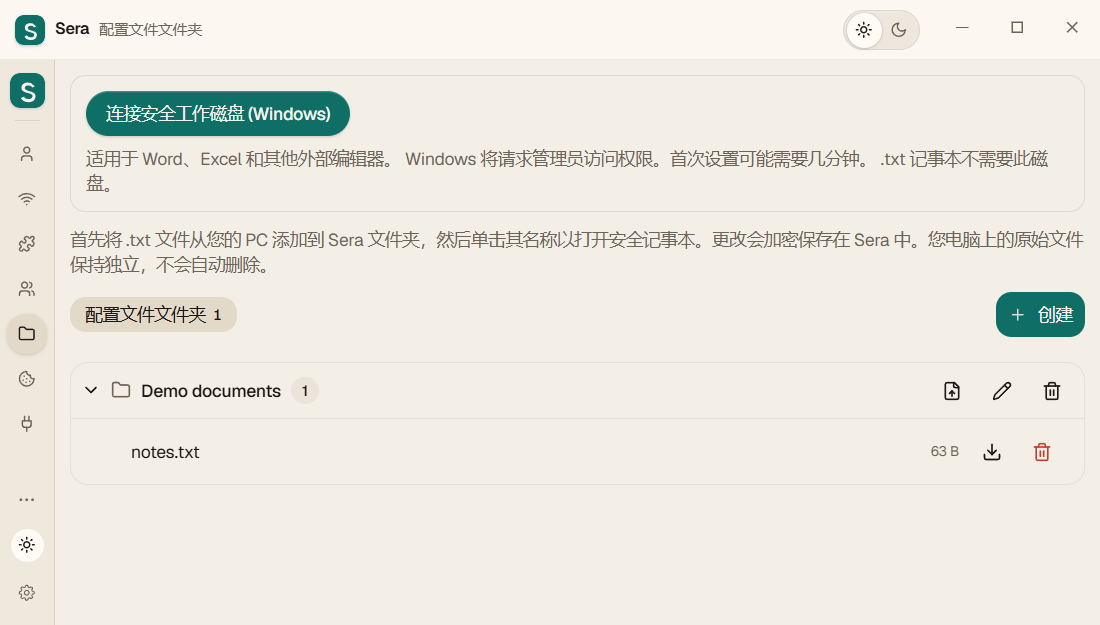
例如建立“装修”文件夹,放入 Excel 预算和 Word 合同,在独立浏览器打开工作邮箱,再添加所需应用。从您的任务开始。
建立工作、学习或项目文件夹,添加文档、表格、图片等。每个文件都可以单独打开、下载或删除。
阅读指南文档通过电脑已安装的编辑器打开。先保存修改,再退出 Sera,工作副本会存入加密存储。Windows 外部编辑使用独立 BitLocker 工作磁盘,需要 BitLocker 支持和 Windows 授权。准备时连接,正常退出时断开。
阅读指南添加 .txt 并点击名称即可编辑。保存到加密存储,不在磁盘上创建明文临时 TXT 文件。电脑上的原文件仍单独保留,不会自动删除。
阅读指南添加已安装或兼容的便携应用,例如 Telegram。可选择指定国家的 VPN 节点、代理或不指定连接。独立路由取决于应用是否接受传入的代理设置,有些应用需要额外配置。
阅读指南从 Sera 打开终端并分配连接。支持代理的命令可以使用它。打开终端并不代表开启整台电脑的 VPN。
阅读指南为配置指定连接,或启用“整台电脑的 VPN”模式。Windows 需要管理员权限,VPN 订阅由您提供。未分配 VPN 的应用使用系统连接;系统本身也可能启用了 VPN。
阅读指南导出加密文件,用 U 盘转移或通过自己的邮箱发送,注意附件大小限制。在另一台电脑下载 Sera,使用对应密钥恢复。如果文件包含有效许可证,剩余付费期限会随之保留。编辑器和运行环境需要另行安装,网站可能要求重新登录。
阅读指南已连接的 AI 发送命令,Eva 在独立后台浏览器中打开页面、阅读、填表和截屏,您可以继续工作。开始前需设置 Eva 及 AI 对本地 API 的访问。
阅读指南文档存储采用由密钥保护的 AES-256-GCM 加密。退出前保存文档,并等待 Sera 完成退出。下载出来的文件、电脑原文件和外部编辑器另建的备份不会自动加密。
不包含应用、应用数据和浏览器缓存。保留文档、设置、登录数据及许可证。已知扩展和 Eva 从网站下载并校验;自定义脚本及扩展保留在文件中。可处理的 Chromium 历史副本会减少同一页面的重复访问。恢复需要联网。取消勾选则使用完整副本。
把工作迁移到另一台电脑Familiar tasks
独立浏览器是工作空间的一部分,帮助您分开账号与任务。
Work email is open in one profile, personal email is open in the other. You don't need to log out of one account every time to log in to another.
Each project has its own profile with the necessary sites and extensions. Accounts of different profiles do not mix with each other.
Upload Sera data to an encrypted file. On another PC, install Sera and download this file with the same key. Some sites may ask you to log in again.
First launch
可以先建立文件夹、加入文档,再按需添加浏览器、应用、VPN 和 Eva。
创建存储并保管密钥。如果已有 Sera 备份,可直接恢复。
创建项目文件夹、添加文件、浏览器配置或应用。
保存修改,换电脑前重新导出。旧备份不会自动更新。
Connect as needed
You don't have to set everything up at once. Choose what you need for your job.
If you already have a VPN subscription, add it to Sera and assign it to the desired profile. You can also run browsers without a VPN.
Sera does not sell VPN servers. VPN is purchased separately from the provider you choose.
Page translator, ad blocker, work with PDF and other tools. Download the CRX file from our store and add it to Sera.
Upload the encrypted file to your computer or connect your Google Drive. Copies are saved in your Google account.
To restore you need a file and its key. You confirm your Google connection.
Choose your system
Download Sera to your computer, install and create your first profile. If you've already used Sera on this PC, the update will preserve your data.
Sera 0.30.0: TXT Secure Notepad, Single File Deletion, Local API, and BitLocker scratch disk for Windows. Close Sera before installation.
Download installer ↓From the first launch to transfer to a second PC. Setting up VPN, extensions, bots, local API, Google Drive and working with protected files.
Open instructions →Updated Sera 0.30.0 for Ubuntu 24.04 x64. Profiles, data transfer, VPN, bots, built-in TXT notepad and deletion of individual files. System Keychain is required for secure connections.
Sera 0.30.0 for macOS Ventura 13.3 and later. Select your Mac's processor. The installers do not contain personal profiles, VPN subscriptions, or accounts.
2026-10-09构建 · Windows / Linux / macOS
How much does it cost
月度和年度使用费用均为 $0。VPN、付费 AI 服务和扩展需另行购买。
Access to the program for 30 days.
Sera 免费使用 →Access to the program for 365 days.
Sera 免费使用 →在最新版 Sera 的使用权限页面选择 $0 的月度或年度方案,然后激活免费使用。激活需要联网。到期后可再次免费激活。如果只看到付款按钮,请更新应用。
支持完全自愿。使用 Sera 无需转账,转账也不代表购买订阅。
月度和年度使用费用均为 $0。VPN、付费 AI 服务和扩展需另行购买。
SERA
您的支持帮助我们改进 Sera、修复问题并添加新功能。如果软件对您有用,欢迎自选金额支持项目。
支持完全自愿。使用 Sera 无需转账,转账也不代表购买订阅。
USDT
TXreq9BwSAT9i4VYTvo4VC5BG12VcEzHKX
USDT
0x52e38bfe343ad4239ef80c892463e6e4af189772
USDT
0x52e38bfe343ad4239ef80c892463e6e4af189772
For those who need automation
A bot is a prepared script: for example, to open the necessary profiles and pages. You can add your own bot to Sera. It is not needed for normal use of the browser.
For those who need their own project for connecting to Google Drive. The assistant prepares the setup, and you confirm your Google login and permissions yourself.
This helper requires Node.js 18+. Setup instructions →
Eva 负责执行浏览器操作。您给自己的 AI 布置任务,AI 向 Sera 发送命令,Eva 在独立的后台 Brave 或 Chrome 中执行。Eva 不自带聊天界面或付费 AI 订阅。
阅读指南Answers before installation
Sera program for computer. In it you create separate browser profiles, open sites, add extensions and save your data.
Sera collects multiple individual browser profiles in one list and helps you manage their extensions, connections, and data transfers. If you need one account and multiple tabs, a regular browser may be enough.
月度和年度使用费用均为 $0。VPN、付费 AI 服务和扩展需另行购买。
No. On a new computer, you start with empty storage. You add your accounts, profiles and VPNs yourself or restore them from your own archive.
On the first PC, upload the data to an encrypted file. On the second one, install Sera, select data download and specify the file and its key. Profiles and settings saved in the archive will be restored. Sites may ask you to re-login; External programs may need to be installed separately.
Storage is where Sera saves your profiles and settings. The key is needed to access protected data. Save it: the new key by itself will not open the old copy.
Files from the Sera store can be downloaded for free. Third party services may have their own subscriptions. Some extensions and bots require additional programs; conditions are specified in the description.
For Windows, select Windows Installer. A build of Ubuntu 24.04 x64 is available for Linux. For Mac, choose Intel or Apple Silicon (M1, M2 and other M), requires macOS 13.3 or later. Mac builds are test: restrictions are indicated next to the links.
The Windows build is internally signed by Sera, while the Mac build is not signed by Apple. This may trigger a publisher warning. Details and checksums are in the download section.
Create “Work” and “Personal” - and see if it’s convenient for you.