A folder for each task
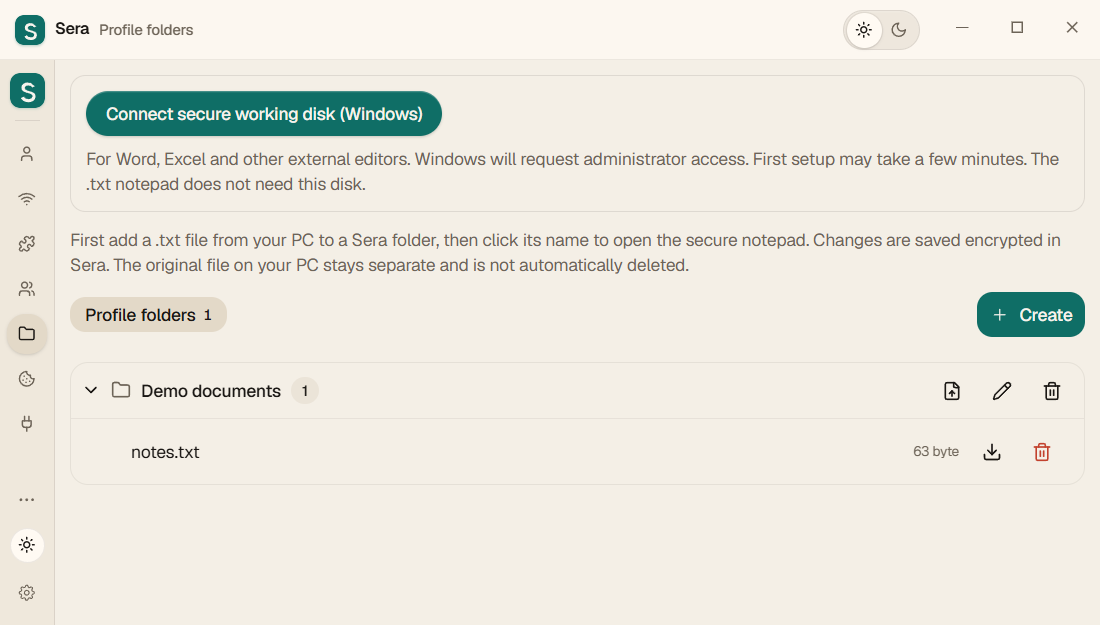
Create Work, Study or Project folders. Add documents, spreadsheets, pictures and other files. Open, download or delete each file separately.
Read the guide SeraFor work and personal mattersDownload ↓
Program for your computer
Task folders, documents, separate browsers and useful applications in Sera. Work on your computer, choose VPN connections, then save your data to an encrypted file and continue on another PC.
Sera is free · Monthly and yearly access cost $0. VPN, paid AI services and extensions are separate.
For example, create a Renovation folder, add an Excel estimate and a Word contract, open work email in a separate browser and add the applications you need. Start with your task.
Create Work, Study or Project folders. Add documents, spreadsheets, pictures and other files. Open, download or delete each file separately.
Read the guideDocuments open in editors installed on your computer. Save your edits first, then quit Sera: it saves the working copies in encrypted storage. Windows external editing uses a separate BitLocker working disk, requiring BitLocker support and Windows permission. It mounts during preparation and disconnects on normal exit.
Read the guideAdd a .txt file and click its name to open the built-in notepad. Saves go to encrypted storage without a plaintext temporary TXT file on disk. The original file added from your PC stays separate and is not automatically deleted.
Read the guideAdd installed or compatible portable applications, such as Telegram, and launch them from Sera. Choose a VPN node in a country, a proxy, or no assigned connection. Separate routing depends on the application honoring supplied proxy settings; some applications need additional configuration.
Read the guideOpen a terminal from Sera and assign a connection. Proxy-aware commands can use it. Opening a terminal does not switch the whole computer to VPN.
Read the guideAssign connections to browser profiles, or use the separate whole-computer VPN mode for the PC’s general internet connection. Windows requires administrator privileges. Supply your own VPN subscription. Without an assigned VPN, an application uses the system connection, which may itself use a system VPN.
Read the guideExport an encrypted archive. Carry it on a USB drive or email it to yourself within attachment limits. Download Sera on the other PC, restore with the matching key and continue. A valid license included in the archive carries its remaining paid term with it. Install required editors and runtimes separately; websites may ask you to sign in again.
Read the guideYour connected AI sends commands; Eva opens pages, reads text, fills fields and takes screenshots in a separate background browser while you keep working. Set up Eva and give your AI access to Sera’s Local API first.
Read the guideDocument storage uses AES-256-GCM encryption, protected by a key. Save documents before quitting and let Sera finish. Files you download from Sera, originals on your PC and separate backups made by external editors are not automatically encrypted.
Excludes applications, their data and browser caches. Keeps documents, settings, sign-ins and license. Known extensions and Eva are downloaded with integrity checks; custom scripts and extensions stay in the archive. Repeated visits to a page are reduced in the Chromium history copy when it can be processed. Internet is required to restore. Uncheck for a full copy.
Move your work to another computerFamiliar tasks
Separate browsers are one part of your workspace. They help keep accounts and tasks apart.
Work email is open in one profile, personal email is open in the other. You don't need to log out of one account every time to log in to another.
Each project has its own profile with the necessary sites and extensions. Accounts of different profiles do not mix with each other.
Upload Sera data to an encrypted file. On another PC, install Sera and download this file with the same key. Some sites may ask you to log in again.
First launch
Begin with a folder and documents. Add browsers, applications, VPN and Eva when needed.
Create storage and keep your login key. If you have a Sera archive, restore your data from it.
Create a project folder, add files, create a browser profile or add an application.
Save edits in your documents. Export a fresh archive before moving computers: old archives do not update themselves.
Connect as needed
You don't have to set everything up at once. Choose what you need for your job.
If you already have a VPN subscription, add it to Sera and assign it to the desired profile. You can also run browsers without a VPN.
Sera does not sell VPN servers. VPN is purchased separately from the provider you choose.
Page translator, ad blocker, work with PDF and other tools. Download the CRX file from our store and add it to Sera.
Upload the encrypted file to your computer or connect your Google Drive. Copies are saved in your Google account.
To restore you need a file and its key. You confirm your Google connection.
Choose your system
Download Sera to your computer, install and create your first profile. If you've already used Sera on this PC, the update will preserve your data.
Sera 0.30.0: TXT Secure Notepad, Single File Deletion, Local API, and BitLocker scratch disk for Windows. Close Sera before installation.
Download installer ↓From the first launch to transfer to a second PC. Setting up VPN, extensions, bots, local API, Google Drive and working with protected files.
Open instructions →Updated Sera 0.30.0 for Ubuntu 24.04 x64. Profiles, data transfer, VPN, bots, built-in TXT notepad and deletion of individual files. System Keychain is required for secure connections.
Sera 0.30.0 for macOS Ventura 13.3 and later. Select your Mac's processor. The installers do not contain personal profiles, VPN subscriptions, or accounts.
Builds dated 2026-10-09 · Windows / Linux / macOS
How much does it cost
Monthly and yearly access cost $0. VPN, paid AI services and extensions are separate.
Access to the program for 30 days.
Sera is free →Access to the program for 365 days.
Sera is free →In the updated Sera, open access settings, choose a month or year for $0 and select Activate free access. Internet is required for activation. Activate again for free when the period ends. If you only see payment buttons, update the app.
Support is optional. A transfer is not required to use Sera and does not purchase a subscription.
Monthly and yearly access cost $0. VPN, paid AI services and extensions are separate.
Support is optional. A transfer is not required to use Sera and does not purchase a subscription.
User Agreement · Payment and return · Contacts ·SERA
Your support helps Sera grow. If the app is useful to you, help us improve it, fix bugs and add new features. Choose any amount.
Support is optional. A transfer is not required to use Sera and does not purchase a subscription.
USDT
TXreq9BwSAT9i4VYTvo4VC5BG12VcEzHKX
USDT
0x52e38bfe343ad4239ef80c892463e6e4af189772
USDT
0x52e38bfe343ad4239ef80c892463e6e4af189772
For those who need automation
A bot is a prepared script: for example, to open the necessary profiles and pages. You can add your own bot to Sera. It is not needed for normal use of the browser.
For those who need their own project for connecting to Google Drive. The assistant prepares the setup, and you confirm your Google login and permissions yourself.
This helper requires Node.js 18+. Setup instructions →
Eva carries out browser actions. You give your AI a task, the AI sends commands to Sera, and Eva performs them in a separate background Brave or Chrome. Eva has no chat of its own or bundled paid AI subscription.
Read the guideAnswers before installation
Sera program for computer. In it you create separate browser profiles, open sites, add extensions and save your data.
Sera collects multiple individual browser profiles in one list and helps you manage their extensions, connections, and data transfers. If you need one account and multiple tabs, a regular browser may be enough.
Monthly and yearly access cost $0. VPN, paid AI services and extensions are separate.
No. On a new computer, you start with empty storage. You add your accounts, profiles and VPNs yourself or restore them from your own archive.
On the first PC, upload the data to an encrypted file. On the second one, install Sera, select data download and specify the file and its key. Profiles and settings saved in the archive will be restored. Sites may ask you to re-login; External programs may need to be installed separately.
Storage is where Sera saves your profiles and settings. The key is needed to access protected data. Save it: the new key by itself will not open the old copy.
Files from the Sera store can be downloaded for free. Third party services may have their own subscriptions. Some extensions and bots require additional programs; conditions are specified in the description.
For Windows, select Windows Installer. A build of Ubuntu 24.04 x64 is available for Linux. For Mac, choose Intel or Apple Silicon (M1, M2 and other M), requires macOS 13.3 or later. Mac builds are test: restrictions are indicated next to the links.
The Windows build uses Sera’s internal signature. The Mac builds are not notarized by Apple. You may see a publisher warning. Details and checksums are available in the download section.
Create “Work” and “Personal” - and see if it’s convenient for you.